Alienware Aw2721D Specs, Features, and Value: Is it worth the price tag?
The Alienware AW2721D occupies a specific niche in the gaming monitor market: a 27-inch, high-refresh, high-color-quality display aimed at competitive gamers who also care about image fidelity. This review examines the AW2721D’s hardware and features, evaluates real-world performance for gaming and creative work, and weighs the product’s value relative to typical buyer priorities. The goal is to give a clear, practical answer to whether the AW2721D is worth its premium price.
Quick overview
Product: Alienware AW2721D (27-inch)
Key selling points: 2560×1440 resolution, very high refresh rate, fast IPS panel, adaptive sync support, strong HDR capability, and Alienware styling with adjustable ergonomics.
Detailed product analysis
Design and build quality
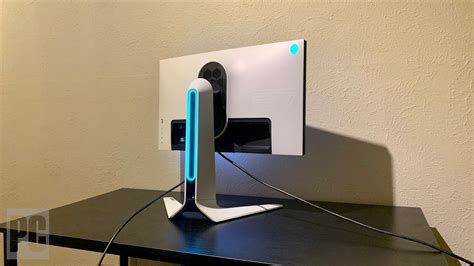
The AW2721D follows Alienware’s signature aesthetic: a solid, angular stand, a stable base, and customizable lighting on the rear. Build quality is above average for a gaming monitor in this segment — the chassis feels sturdy and the stand provides full ergonomic adjustments (height, tilt, swivel, and pivot). The monitor’s thin bezels on three sides keep a multi-monitor setup visually tidy, and port placement at the rear and downwards-facing USB ports are practical for desk routing.
Panel, resolution, and image quality
The AW2721D is a 27-inch QHD display (2560×1440), a popular compromise between pixel density and GPU performance. The panel is an IPS-type engineered for speed: it delivers wide viewing angles and accurate color reproduction while offering the quick pixel response needed for fast-paced gaming. The QHD resolution on a 27-inch screen gives a good balance of sharpness and performance demands — games run more smoothly than at 4K while still looking detailed on desktop work.
Color performance is a strong point. The AW2721D targets a wide color gamut suitable for content creation and media consumption; it typically covers a large portion of sRGB and a significant chunk of DCI-P3, which makes photos and HDR-enabled titles look richer. The monitor also supports a HDR profile with a higher peak brightness than many standard gaming displays, improving highlight detail in supported content. For serious color-critical professional work, calibration is recommended, but out of the box the AW2721D sits in a higher tier than most esports-first monitors.
Refresh rate and motion handling
Where the AW2721D shines is in motion: it supports a very high refresh rate that benefits competitive gamers. The native refresh rate and fast response times reduce motion blur and provide a fluid feel in first-person shooters and fast-action titles. Adaptive sync technology is included to eliminate tearing and stuttering when paired with a compatible GPU, and the combination of high refresh and low input lag helps reduce perceived latency.
HDR and brightness
The monitor supports HDR content and offers a higher peak brightness than entry-level displays, which helps HDR highlights pop when the source and game support it. While it is not a reference-grade HDR display, the inclusion of HDR support plus good local contrast and a competent backlight system means HDR-enabled games and movies benefit noticeably compared with typical SDR gaming monitors.
Connectivity and extras
Connectivity typically includes DisplayPort (required for the highest refresh rates), HDMI (useful for consoles and secondary devices, with bandwidth limits depending on HDMI version), several USB ports for peripherals, and a headphone jack. AlienFX lighting and on-screen display (OSD) controls give users customization options for aesthetics and calibration. Software integration allows for quick profile switches and fine-tuning for different uses (gaming, movie, color work).
Ergonomics and user controls
Ergonomics are practical for desktop setups: the stand offers height, swivel, tilt, and pivot adjustments so the display can be positioned precisely. The OSD is accessible via a joystick or buttons on the monitor, enabling users to change color presets, overdrive settings, and game-specific options quickly.
Shop the latest Electronics picks on Amazon.
Browse Now →Real-world use cases
Competitive gaming (FPS, esports)
For competitive players, the AW2721D’s combination of QHD clarity and high refresh rate provides a real advantage. The panel’s rapid pixel response minimizes ghosting, and adaptive sync eliminates tearing when frame rates vary. Players who prioritize framerate and responsiveness — for example, CS:GO, Valorant, or high-FPS modes in shooters — will find the monitor’s speed and input characteristics compelling.
Single-player and immersive gaming
In single-player AAA titles, the AW2721D balances visual fidelity and smoothness. The QHD resolution keeps textures crisp without the GPU cost of 4K, and the wide color gamut and HDR support enhance atmosphere and visual depth. For players who want both speed and image quality (e.g., action RPGs, racing titles), it’s a solid all-around choice.
Content creation and productivity
Photographers, video editors, and designers who need an accurate and wide color gamut will appreciate the monitor’s color performance. While it may not replace a professional reference display for color-critical mastering, it is capable for mainstream creative workflows — especially when paired with calibration hardware. Productivity tasks benefit from the QHD workspace, which offers more screen real estate than 1080p while keeping text comfortably readable at normal desk distances.
Console gaming and multimedia
Console users should note that to reach the highest refresh rates the AW2721D requires a PC and DisplayPort connection; many consoles will run at lower refresh or resolution on the HDMI input. For movies and streaming, its brightness and color reproduction result in pleasing HDR playback compared with standard SDR monitors, but full HDR experience depends on source content and settings.
Pros & Cons
- Pros:
- High refresh rate on a 27" QHD panel — excellent balance for gaming and image quality
- Fast IPS performance with low response times for minimal motion blur
- Strong color reproduction and HDR support for richer visuals and creative work
- Solid build and flexible ergonomics suitable for long sessions
- Practical connectivity including DisplayPort and USB hub
- Cons:
- Premium price that puts it above many value-focused 1440p displays
- HDR performance is good but not class-leading; local dimming is limited compared with high-end HDR panels
- High refresh rate requires a powerful GPU to get the most benefit at QHD
- Console users may not be able to fully utilize the monitor’s top refresh without the latest console hardware
How the AW2721D compares to alternatives
| Model | Panel / Size | Resolution | Max Refresh | Adaptive Sync | HDR | Target buyer |
|---|---|---|---|---|---|---|
| Alienware AW2721D | Fast IPS / 27" | 2560×1440 (QHD) | Very high (top-tier refresh) | NVIDIA G-SYNC certified / variable sync | HDR support (higher peak brightness) | Competitive gamers who want color fidelity |
| Dell S2721DGF (example mainstream) | IPS / 27" | 2560×1440 (QHD) | 165 Hz | FreeSync / G-SYNC compatible | Basic HDR (limited peak brightness) | Value-conscious gamers wanting high refresh at lower price |
| 4K 144Hz alternatives (e.g., higher-res options) | IPS / 27" | 3840×2160 (4K) | Up to 144–160 Hz | Variable sync depending on model | HDR capable (varies widely) | Users prioritizing pixel density and visual fidelity over highest refresh |
The table emphasizes the AW2721D’s sweet spot: it targets buyers who want both competitive refresh rates and better-than-average color and HDR capability. Cheaper QHD 165Hz monitors trade peak speed for lower cost, while 4K high-refresh options trade higher pixel density for more GPU demand and commonly lower refresh ceilings.
Buying guide — what to consider before purchasing
1. Intended use
Buyers should consider whether they prioritize competitive framerates or visual fidelity. If the priority is highest possible framerate for esports titles, NVIDIA/AMD compatibility, and lower latency, the AW2721D is attractive. If the priority is maximum resolution for single-player immersion or content creation, a 4K monitor or a dedicated color-critical display might be preferable.
2. GPU capability
The AW2721D’s benefits are most noticeable when the GPU can deliver high frame rates at QHD. For users with mid-range graphics cards, the monitor will still look great, but the high refresh advantage will be less meaningful. Prospective buyers should match the monitor to their GPU: high-refresh QHD pairs best with recent high-end or upper mid-range GPUs for modern AAA titles at competitive settings.
3. Connectivity needs
Confirm that the PC and peripherals support the monitor’s best inputs. DisplayPort is typically required to unlock the monitor’s maximum refresh rate and color modes. If multiple devices will connect (PC, console, capture devices), check the available HDMI and USB ports and whether switching between them fits the user’s workflow.
4. Desk space and ergonomics
Measure desk space and consider the stand footprint. The AW2721D offers robust ergonomics, but players who prefer a dual-monitor setup or wall mounting should verify VESA compatibility and stand adjustability to meet their setup requirements.
Shop the latest Electronics picks on Amazon.
View Offers →5. HDR expectations
HDR support on gaming monitors varies. If HDR is a primary requirement, understand that HDR on this class of monitors improves highlights and color but will not match the local-dimming precision of true HDR reference displays. Adjust expectations for dramatic black-level contrast and deep local dimming zones.
6. Price and long-term value
Compare the monitor’s price against alternatives. The AW2721D is a premium product; buyers should weigh how much they value higher refresh and color at QHD versus less expensive 1440p 144/165Hz models or a move to 4K. Consider the lifespan of a monitor in the user’s setup and whether a higher upfront cost provides measurable benefits across the intended use cases.
Typical buyer concerns, answered
“Is the AW2721D worth it for FPS players?”
Yes, for players who value a fluid experience and can sustain high frame rates with their GPU, the AW2721D delivers a competitive edge through reduced motion blur and low latency. The additional benefit is color quality — so it’s suitable for gamers who don’t want to sacrifice visual richness for performance.
“Will it noticeably improve photo and video work?”
It will improve day-to-day photo/video editing compared with budget gaming panels because of better color gamut coverage and more consistent color. However, professionals requiring exact color matching should still rely on a calibrated reference monitor or hardware calibration workflow.
“Do console gamers get the full benefit?”
Console users will generally see excellent colors and responsiveness, but they may not access the monitor’s highest refresh rates unless using newer console hardware and the correct input. For console-first buyers, consider console output capabilities and whether the monitor’s premium refresh features will be used.
Conclusion
The Alienware AW2721D is a high-performance 27-inch QHD monitor that successfully blends competitive gaming features with above-average color and HDR capability. It is best suited to buyers who want the responsiveness of a very high refresh rate while retaining excellent image quality for single-player games, multimedia, and light creative work. The monitor’s premium build, flexible ergonomics, and feature set justify its price for users who will consistently exploit its strengths — namely, high frame rates at QHD and better-than-average color reproduction.
For those on tighter budgets or who prioritize either extreme HDR fidelity or maximum resolution (4K), alternative displays may represent better value. However, for the target user — a competitive or hybrid gamer with a capable GPU and a desire for both speed and image quality — the AW2721D remains a compelling, well-rounded option. Buyers should weigh GPU capabilities, HDR expectations, and how much they value top-tier refresh when deciding whether the monitor’s premium is worth paying.