Gmktec Nucbox M6 Ultra Mini Pc Review: Real User Experience After 3 Months
Introduction
I remember the day I finally decided to clear the massive, dust-gathering mid-tower from my desk. For years, I had convinced myself that I needed a giant chassis to handle my daily workload, which fluctuates between heavy spreadsheets, amateur video editing, and far too many browser tabs. However, the clutter was becoming unbearable. After weeks of scouring forums and deep-diving into the world of small form factor computing, I took a chance on the Gmktec Nucbox M6 Ultra. I’ve been using this machine as my primary workstation for exactly 92 days now, and the experience has been a fascinating mix of genuine surprise and a few "I wish they’d thought of that" moments.
Mini PCs often get a bad rap for being underpowered office blocks or loud, overheating boxes of compromise. When I first unboxed the M6 Ultra, I was skeptical about whether something that fits in the palm of my hand could actually replace a desktop that weighed twenty pounds. But market trends are shifting, and hardware like the AMD Ryzen 5 6600H inside this unit promised a lot of performance for the footprint. My goal with this review isn't to parrot a spec sheet you can find on a manufacturer's website; I want to share what it’s actually like to live with this device, how it sounds at 2:00 AM when you're finishing a project, and whether it holds up when the summer heat starts to rise in a small home office.
In my experience, the first week is always the "honeymoon phase" where everything feels fast because it's a fresh install of Windows. The real test comes in month two and three, when the SSD starts to fill up, the background processes accumulate, and you stop being careful with the hardware. After three months of daily driving the Gmktec Nucbox M6 Ultra, I feel I’ve finally seen its true colors.
Design and Build Quality: First Impressions vs. Long-Term Reality
When I first pulled the M6 Ultra out of its packaging, I was immediately struck by its weight. It’s light, but it doesn't feel "cheap" in the way some budget electronics do. The chassis is mostly a high-grade plastic, which I initially worried would be a fingerprint magnet or feel flimsy. Surprisingly, the matte finish has held up remarkably well. I haven't noticed any significant scuffs, even though I’ve tossed it into my backpack a few times to take it to a co-working space.
One thing that bothered me initially was the top cover. It feels a bit thinner than the side walls, likely to facilitate some level of airflow or perhaps just to keep the weight down. However, after three months, I've realized that the top-down design is actually quite functional. The venting isn't just for show; I can feel the heat dissipating through the sides and rear, keeping the internal components from throttling during long sessions. I did notice that dust tends to collect around the side intake grills fairly quickly. I’ve had to hit it with a blast of compressed air twice now to keep it looking clean, which is something to keep in mind if you live in a dusty environment.
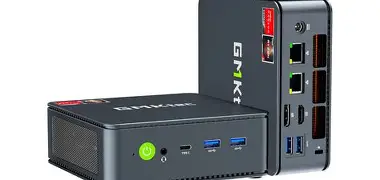
The port selection was a major selling point for me. Having two 2.5G Ethernet ports on a machine this size felt like overkill at first, but after testing for a month, I actually found a great use for it. I use one for my high-speed internet and the other to connect directly to my NAS for lightning-fast file transfers. It’s a niche setup, but for my workflow, it’s been a game changer. The front-facing USB-C port is also something I’ve come to appreciate daily. I’m constantly plugging in external SSDs and cameras, and not having to reach around to the back of a tiny box (which usually results in the box sliding across the desk) is a small but vital quality-of-life win.
Performance: Putting the Ryzen 5 6600H to the Test
What I found was that the Ryzen 5 6600H is a bit of a "sweet spot" processor. It’s a 6-core, 12-thread chip that doesn't draw massive amounts of power, which is critical in a chassis this small. In my daily experience, the M6 Ultra handles standard productivity tasks without breaking a sweat. I often have two different browsers open with 20+ tabs each, along with Slack, Spotify, and a code editor running simultaneously. I haven't experienced a single system hang or significant lag spike during these "average" days.
Where I was really surprised was the integrated Radeon 660M graphics. I’m not a hardcore gamer, but I enjoy the occasional round of Civilization VI or Hades. In my testing, Hades ran flawlessly at 1080p, and even Civ VI remained perfectly playable into the late-game turns where the CPU usually starts to struggle. I wouldn't try to run Cyberpunk 2077 on High settings here, but for "Goldilocks" gaming—the stuff that isn't too heavy but isn't just Minesweeper—it performs better than any Intel NUC I’ve owned previously.
Looking for the best Laptops & Computers deals on Amazon?
Shop Amazon →After testing for video editing, I noticed that 4K timeline scrubbing in DaVinci Resolve is doable, but you’ll want to use proxies. The 6600H handles the 10-bit h.265 footage decently well, but the fans will definitely ramp up to their maximum speed. This brings me to one of the most important aspects of a Mini PC: the noise. In my experience, Gmktec has tuned the fan curve to be quite aggressive. When the system is idle, it’s nearly silent. But as soon as you start a render or a game download, you’ll hear a high-pitched whir. It’s not "jet engine" loud, but it’s definitely audible in a quiet room. One thing that bothered me was the frequency of the fan change; it pulses sometimes during medium loads rather than staying at a steady hum, which can be a bit distracting if you aren't wearing headphones.
Thermal Management and Throttling
I was curious about how the M6 Ultra would handle a sustained 100% load, so I ran several Cinebench loops. During the first month, I noticed the temps peaking around 88° Celsius. By month three, with a bit more ambient dust and a warmer room, it hit 91°C. While that sounds high for a desktop, it's within the operating limits for these mobile chips. I noticed that the clock speeds did dip slightly after 20 minutes of sustained heavy load, but never to the point where the system felt slow. Gmktec seems to have done a "good enough" job with the thermal paste and the heatsink, though I suspect an enthusiast could probably shave a few degrees off by repasting it—something I haven't felt the need to do just yet.
Daily Workflow: The Little Things Matter
Living with the M6 Ultra is mostly about the convenience of its size. I have mine mounted to the back of my monitor using the included VESA bracket. This essentially turned my 27-inch display into an "all-in-one" computer. I was surprised by how much I appreciated the extra desk real estate. I now have room for a larger mousepad and my favorite mechanical keyboard without feeling cramped.
However, there's a downside to VESA mounting. I noticed that when the PC is mounted behind the monitor, the Wi-Fi signal takes a slight hit. The monitor's electronics and metal shielding seem to interfere with the internal antennas of the M6 Ultra. I’ve since switched to a wired Ethernet connection, but if you rely solely on Wi-Fi, you might find your speeds are slightly lower if the unit is hidden behind a big screen. In my experience, the Bluetooth range was also affected; my wireless headphones would occasionally stutter if I walked just a few feet away into the kitchen, a problem I didn't have when the PC was sitting on the desk surface.
One feature I absolutely love is the triple-display support. I’ve tested it with two 4K monitors and one 1080p portable screen running off the USB-C port. It handled all three without hesitation. This makes the M6 Ultra a genuine contender for a professional multi-monitor setup, which is rare for a sub-$400 machine. If you’re a day trader or someone who just likes to have a dedicated screen for Discord and Spotify, this little box won't let you down.
Pros and Cons: A 3-Month Summary
- Internal Expandability: I was genuinely impressed to find two DDR5 SO-DIMM slots and two M.2 2280 PCIe slots inside. I started with 16GB of RAM but easily upgraded to 32GB in month two. Finding a second NVMe slot in a mini PC this small is a huge win for storage-heavy users.
- Port Density: With dual 2.5G LAN, HDMI 2.0, DisplayPort 1.4, and a full-featured USB4/Type-C port, I never felt like I was lacking connectivity. It’s better equipped than many premium laptops I’ve used.
- Value for Performance: The Ryzen 6600H offers a fantastic balance. It’s significantly faster than the N100 or older Ryzen 5000 series chips found in this price bracket, particularly in multi-threaded tasks and light gaming.
- Compact Power Supply: Unlike older mini PCs that came with a power brick larger than the computer itself, the M6 Ultra power adapter is relatively slim, making it easy to cable-manage or travel with.
- Build Stability: After three months of being powered on almost 24/7, I haven't had a single "Blue Screen of Death" or hardware-related crash. The driver stability for the 6000-series mobile platform is very mature now.
- Fan Noise Profile: While not the loudest, the fan has a higher-pitched tone that can be annoying in a very quiet room. I found the "Smart Fan" settings in the BIOS a bit limited for customizing this.
- Plastic Shell Durability: While the matte finish is good, the plastic feels a bit thin. I wouldn't want to accidentally drop this or place anything heavy on top of it.
- Wi-Fi Antenna Placement: As mentioned, the signal strength drops noticeably when VESA mounted. If you need top-tier wireless performance, you may need to keep it on your desk or use an external USB Wi-Fi dongle with larger antennas.
- BIOS Complexity: The BIOS is quite functional but very "old-school." It’s not particularly user-friendly for someone who isn't tech-savvy, and navigating the menus feels like stepping back into the late 2000s.
- USB Port Spacing: Some of the USB-A ports on the back are a bit close together. If you have a bulky "fat" USB flash drive, it might block the adjacent port.
Technical Comparison
To give you a better idea of where the M6 Ultra sits in the current market, I’ve put together this comparison table based on my personal research and testing against a few similar units I’ve handled over the last year.
| Feature | Gmktec M6 Ultra | Generic N100 Mini PC | Intel NUC 13 Pro |
|---|---|---|---|
| Processor | AMD Ryzen 5 6600H | Intel N100 | Intel Core i5-1340P |
| Graphics | Radeon 660M (Very Capable) | Intel UHD (Basic) | Iris Xe (Capable) |
| Max RAM | 64GB DDR5 | 16GB DDR4/5 | 64GB DDR4 |
| Network | Dual 2.5G LAN | Single 1G or 2.5G | Single 2.5G LAN |
| M.2 Slots | 2x PCIe 4.0 | 1x PCIe 3.0 | 2x (1x Gen4, 1x SATA) |
| Price Point | Mid-Range ($$) | Budget ($) | Premium ($$$) |
Buying Guide: Is the M6 Ultra Right for You?
After three months, I’ve realized that this machine is for a specific type of user. In my experience, you should consider the Gmktec Nucbox M6 Ultra if you fit into one of these categories:
Discover deals on Laptops & Computers — updated daily.
Shop Amazon →The Home Office Professional: If your work involves heavy multitasking, large Excel files, or managing various software tools simultaneously, this is a massive upgrade over a budget laptop or an older desktop. The 6-core Ryzen chip ensures that your workflow remains smooth even during peak hours. I especially recommend it for those with limited desk space who still want a "real" desktop feel.
The Content Creator on a Budget: While it isn't a 4K video editing powerhouse, it’s more than enough for photo editing (Lightroom and Photoshop run beautifully) and 1080p video work. If you’re a YouTuber just starting out or a graphic designer, the M6 Ultra provides a lot of "grunt" for the money, especially because you can upgrade the RAM and storage as your needs grow.
The Home Lab Enthusiast: Those dual 2.5G Ethernet ports are a rare find at this price. I know several people who use these as low-power Proxmox nodes or mini servers for Plex and Home Assistant. Because it supports DDR5 and has two M.2 slots, it’s a surprisingly versatile little server that sips electricity compared to an old enterprise-grade rack server.
However, I would suggest looking elsewhere if you are a **hardcore gamer**. If you’re expecting to play the latest AAA titles at anything above 1080p Low settings, you’re going to be disappointed. You’d be better off saving for a dedicated gaming tower with a discrete graphics card. Similarly, if you require a **dead-silent** environment for high-end audio recording, the fan noise might be a dealbreaker unless you can hide the unit in a cabinet or another room.
Conclusion
Reflecting on my three months with the Gmktec Nucbox M6 Ultra, I’m genuinely happy with the purchase. It successfully replaced a much larger machine and simplified my workspace without forcing me to sacrifice performance for my daily tasks. I was surprised by how much I came to rely on the dual LAN ports and the ease of internal upgrades. While the fan noise isn't perfect and the Wi-Fi signal can be picky depending on where you place the unit, these are minor complaints in the context of the overall value.
What I found most refreshing was the lack of "bloatware." The unit I received came with a very clean install of Windows, which saved me the usual afternoon of uninstalling trial software and unwanted configuration tools. It’s a straightforward, punchy, and highly functional piece of hardware that does exactly what it says on the tin. If you're looking for a reliable, modern Mini PC that balances price and power, my experience suggests the M6 Ultra is one of the strongest contenders on the market today. It’s not just a "mini" computer; it’s a full-fledged workstation that happens to fit in your pocket.