The Ultimate Setup Guide for Your A9G OLED
The arrival of a flagship television like the Sony A9G Master Series OLED marks a significant upgrade in any home cinema enthusiast's journey. As part of Sony's prestigious Master Series, the A9G was engineered to deliver a picture that remains as faithful to the creator's intent as possible. However, pulling this thin marvel out of its box is only the beginning. To truly appreciate the deep blacks, vibrant colors, and acoustic surface audio that define this model, a systematic approach to setup, calibration, and environmental optimization is required. This guide provides a comprehensive roadmap to getting the most out of the A9G, ensuring that its sophisticated processing power is utilized to its full potential.
Understanding the Master Series Philosophy
Sony’s Master Series designation is not merely a marketing label; it represents a specific engineering philosophy where each panel is calibrated at the factory to meet stringent standards. The A9G OLED utilizes the Picture Processor X1 Ultimate, which is the brain behind the operation. This processor detects hundreds of individual objects on the screen and enhances their resolution, brightness, and color. When setting up the A9G, it is important to remember that the goal is not to "over-process" the image but to peel back the layers of digital interference to let the raw quality of the OLED panel shine through. Owners typically care about three primary pillars: contrast accuracy, color fidelity, and motion handling. This television excels in all three, provided the software settings are matched to the viewing environment.
Unboxing and Physical Placement
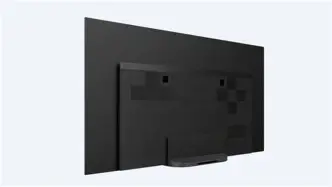
The physical setup of an OLED is more critical than that of a standard LED-LCD because of its unique panel structure and viewing angle capabilities. The A9G features a remarkably slim design with a stand that keeps the screen extremely low to the surface it sits on. This "One Slate" design is aesthetically pleasing but presents a challenge for those intending to use a soundbar. If the TV is placed on a media console, a soundbar will likely block the bottom inch of the screen. Users should consider either wall-mounting the unit or using an aftermarket specialized riser if a soundbar is essential. However, the A9G features Acoustic Surface Audio+, where the screen itself acts as the speaker. For many, this eliminates the need for a traditional center channel, as the TV can even be integrated into a larger home theater system as a dedicated center speaker using the terminals on the back.
Placement relative to windows is also vital. While OLED technology has improved in brightness, it still cannot compete with the raw nits of a high-end LED in a sun-drenched room. For the best experience, the A9G should be placed in a room where light can be controlled. Reflections on the glossy panel can detract from the celebrated "infinite contrast" that OLED is known for. Ideally, the screen should be perpendicular to light sources rather than directly opposite them.
Calibration and Picture Settings Analysis
Once the TV is positioned, the most influential part of the setup begins: the software configuration. Sony provides several presets, but for the purist, "Custom" is the most accurate out-of-the-box mode. Unlike "Vivid" or "Standard," the Custom mode disables the aggressive "soap opera effect" and artificial sharpening that can make high-end cinematography look like a daytime soap opera.
The Brightness and Contrast Balance
On an OLED, "Brightness" usually refers to the intensity of the panel's light, while "Black Level" refers to the floor of the shadows. For SDR (Standard Definition Range) content, such as cable TV or older Blu-rays, keeping the Brightness at a moderate level (around 15-20) helps preserve the lifespan of the organic pixels and prevents eye strain in dark rooms. For HDR (High Dynamic Range) content, the TV will automatically spike the brightness to its maximum to accommodate the wider range. Peak Luminance should generally be set to "High" for HDR to ensure those specular highlights—like sunlight reflecting off water or the glow of a flashlight—pop against the dark backgrounds.
Color and Clarity
Sony’s Triluminos display technology manages color saturation with a delicate touch. In the "Expert 1" or "Expert 2" color temperature settings, the A9G leans toward the D65 white point used by Hollywood colorists. It may look slightly "warm" or "yellow" to a viewer used to the blue-heavy tint of cheaper displays, but this is actually the correct setting for accurate skin tones and natural landscapes. Settings like "Reality Creation" should be used sparingly; while it is excellent at upscaling 1080p content to look like 4K, setting it too high can introduce grain and digital noise.
Shop the latest TVs & Home Theater picks on Amazon.
View Offers →Motion Handling: The Sony Advantage
Motion is where the A9G truly outclasses its competitors. The Motionflow settings allow for a "True Cinema" mode, which preserves the 24p cadence of films without adding unnecessary smoothness. For sports, a slight increase in "Smoothness" can help follow the ball, but for 95% of viewing, keeping motion interpolators at their minimum maintains the integrity of the film's intended look.
The Integrated Audio Experience
One of the most innovative features of the A9G is the Acoustic Surface Audio+. Using actuators behind the panel, the entire screen vibrates to produce sound. This means that if a character on the left side of the screen speaks, the sound literally radiates from that specific spot. In the setup menu, users should run the Auto Acoustic Calibration. This uses the microphone in the remote to ping the room and adjust the frequency response of the TV speakers based on the acoustics of the space. It compensates for curtains, hard floors, and furniture that might otherwise muddy the sound.
Comparing the A9G to Its Contemporaries
To understand the value of the A9G, it helps to see how it stacks up against the broader market of premium televisions. While many OLEDs use similar panels (often sourced from LG Display), the difference lies in the "secret sauce" of the processing and the heat management of the panel.
| Feature | Sony A9G OLED | Typical High-End LED | Standard OLED Models |
|---|---|---|---|
| Black Levels | Infinite (Perfect) | Good (Local Dimming) | Infinite (Perfect) |
| Processing | X1 Ultimate (Flagship) | Mid-to-High Range | Standard Processing |
| Audio Tech | Acoustic Surface Audio+ | Downward Firing Speakers | Standard Speakers |
| Motion Clarity | Industry Leading | Variable (BFI used) | Good |
| Upscaling | Superior (Object-based) | Average | Above Average |
Pros and Cons of the A9G OLED
While the A9G is widely considered a masterpiece of television engineering, it is not without its trade-offs. Prospective and current owners should weigh these factors when deciding how to integrate the unit into their homes.
- Pro: Unmatched Upscaling - The X1 Ultimate processor makes 720p and 1080p content look remarkably close to native 4K, which is essential for streaming and cable viewers.
- Pro: True-to-Life Colors - Sony’s factory calibration in "Custom" mode is often cited by professionals as the most accurate available without a paid professional calibration.
- Pro: Central Speaker Mode - The ability to use the TV as the center channel in a 5.1 or 7.1 setup is a game-changer for clean home theater aesthetics.
- Pro: Ultra-Wide Viewing Angles - Because it is an OLED, the picture does not wash out or lose color accuracy even when viewed from a sharp side angle.
- Con: Reflected Glare - The glossy finish is beautiful but can act like a mirror in rooms with uncontrolled bright lighting.
- Con: Low Stand Height - Finding a soundbar that doesn't block the screen is a persistent logistical hurdle for non-wall-mounters.
- Con: Peak Brightness - While great for dark rooms, it doesn't reach the piercing brightness levels of Sony's own Z-series LED models.
A Buying and Usage Guide for Different Users
How you set up the A9G depends heavily on what you intend to do with it. The needs of a cinephile are vastly different from those of a casual gamer or a sports fan.
For the Move Enthusiast
If your primary use is watching 4K HDR Blu-rays or high-quality streams from platforms like Netflix and Disney+, your focus should be on accuracy. Ensure that "Netflix Calibrated Mode" is utilized if you are a subscriber, as it optimizes the settings specifically for that app's metadata. Turn off all "Auto" contrast enhancers, as these can fluctuate the brightness of the screen mid-scene, which is distracting during cinematic transitions.
Discover deals on TVs & Home Theater — updated daily.
See Deals →For the Console Gamer
The A9G supports an "Auto Low Latency Mode" and has a dedicated "Game" mode preset. While OLEDs have near-instantaneous response times, you want to ensure that the input lag is minimized by selecting this mode. One concern for gamers is "burn-in" or "image retention." To mitigate this, ensure the "Pixel Shift" feature is turned on in the settings, and keep the Brightness setting at a reasonable level if you play games with static HUDs (heads-up displays) for many hours at a time. The A9G also has a "Panel Refresh" feature, but this should only be used once a year at most, as it is a heavy-duty process for the organic pixels.
For the Sports Fan
High-motion content like football or racing benefits from Sony's "CineMotion" setting. Set this to "Auto" to help the TV identify when it is receiving a broadcast signal versus a film signal. This allows the processor to apply the necessary frame interpolation to keep the action smooth without making the players look like they are moving in fast-forward.
Smart Features and Android TV Optimization
The A9G runs on the Android TV platform (which transitioned toward Google TV in later iterations). To keep the experience fluid, users should periodically clear the cache of heavy apps like YouTube or Plex. One expert tip is to disable the "Sony Select" and "Samba TV" tracking features in the initial setup menus; this not only protects your privacy but also frees up background processing power, making the menu navigation feel significantly snappier. Calibration of the built-in Chromecast is also worthwhile if you plan on casting high-bitrate photos or videos from your mobile device to the large screen.
Long-term Maintenance and Care
Owning an OLED is a bit like owning a high-performance sports car—it requires specific care to maintain its longevity. Beyond the software settings, physical care is paramount. Never use harsh chemicals or window cleaners on the A9G’s screen. The anti-reflective coating is sensitive and can be permanently damaged by ammonia-based products. Instead, use a clean, dry microfiber cloth. If a smudge is stubborn, a very slight dampening of the cloth with distilled water is all that is required. Additionally, always make sure the TV is allowed to go into its "standby" mode rather than being unplugged from the wall completely. When the screen is off but plugged in, the A9G performs "compensation cycles" in the background to keep the pixel voltages uniform and prevent burn-in.
Conclusion
The Sony A9G OLED remains a benchmark for what a premium television should be. It represents a perfect marriage of hardware and software, where the limitations of the OLED panel are mitigated by world-class processing. By taking the time to properly position the unit, select the "Custom" picture mode, and calibrate the acoustic surface audio to your specific room geometry, you transition from simply "watching TV" to experiencing a home theater. Whether it is the local-dimming-free blacks that make space scenes look terrifyingly vast, or the subtle color gradations that bring a sunset to life, the A9G rewards the diligent owner with a level of immersion that few other displays can match. Setting up this television is an exercise in restraint—trusting the engineering of the Master Series to do the heavy lifting while you simply remove the digital barriers to its greatness.